How to Charge LED Face Mask Devices the Right Way
Charge the part of the LED face mask that actually holds the battery, then unplug it once the charging indicator shows it is full. On many masks, that means charging the controller or battery pack rather than the mask panel itself, so the first thing to check is not the cable—it is which component is rechargeable.
How do you charge an LED face mask?
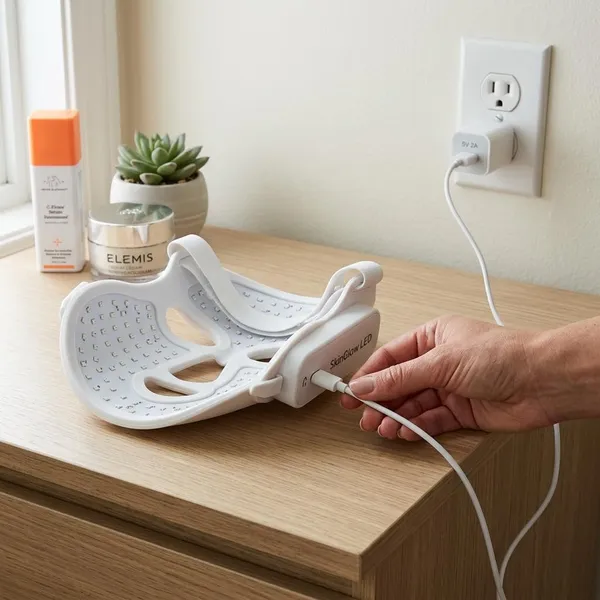
The safest routine is simple: turn everything off, find the charging input on the battery-holding part, connect the recommended cable, use a compatible power source, then watch the indicator light. If you are charging before bedtime or after a skincare session, do this on a dry table rather than beside a sink.
Turn the mask off
Switch the mask off before charging so the battery is not trying to run the LEDs and charge at the same time. If a treatment cycle is still active, stop it first, remove the mask, and then connect the cable.
Find the correct charging port
Look for the port marked with a USB symbol, battery icon, "DC," or a shape that matches the supplied cable. On masks with a separate controller, one port may connect the mask to the controller while a different port charges the controller.
Connect the recommended charging cable
Use the original cable when you still have it. It is more likely to fit firmly, which matters because a slightly loose USB-C or micro-USB connection can make the mask appear faulty even when the battery is fine.
If you replace the cable, match the connector type exactly and choose one that sits securely in the port. A cable that only works when bent at an angle is already a troubleshooting problem.
Plug into an approved power source
Use the power source recommended by the manufacturer. Many LED face masks are designed for standard USB charging, but you should be careful with high-power fast chargers unless the brand clearly allows them.
If you only have a phone charger nearby, check the output printed on the charger and compare it with the mask instructions. For occasional use, a basic compatible USB wall adapter or laptop port is usually the safer choice than guessing with the strongest charger in the drawer.
Check the charging indicator
After plugging in, wait a few seconds and look for the charging signal. Depending on the model, a blinking light, pulsing light, battery icon, or color change may show that charging has started.
- Blinking or pulsing: often means charging is in progress.
- Solid light: often means the battery is full.
- No light: check the port, cable, adapter, and battery-holding part.
Disconnect once charging is complete
Unplug the mask, controller, or battery pack once the indicator shows a full charge. Leaving it connected for a short time is not usually an emergency, but making overnight charging a habit is not ideal unless the manufacturer specifically says it is fine.
Which part of an LED face mask do you charge?
You charge the component with the rechargeable battery. That may be the controller, a separate battery pack, the mask body itself, or a wireless remote. If you are not sure, start by locating the battery indicator and the dedicated charging input.
Rechargeable controller
Many home LED masks use a wired handheld controller as the power hub. If your mask plugs into a small remote-style unit with buttons, timer settings, or intensity modes, that controller is often the part that needs charging.
This matters when the mask will not turn on after storage. The LED panel may be perfectly fine, but the controller battery may be empty.
Battery pack
Some masks use a separate battery pack that clips onto clothing or sits in a pocket during use. In that setup, charge the pack, not the mask panel.
This design is useful for longer sessions because it keeps weight off your face, but it also means you need to keep track of one extra part. If you use the mask several times a week, charging the pack after every few sessions is easier than waiting until it dies mid-treatment.
Built-in mask battery
If there is no separate controller or power pack, the rechargeable battery may be built into the mask frame. The charging port is usually on the edge of the mask, near the strap area, or close to a small control button.
Wireless remote or control unit
Some systems include a wireless remote or detachable control unit that charges separately. If the mask seems charged but does not respond to button presses, check whether the remote has its own low-battery indicator or charging port.
How to charge an LED mask safely
Safe charging is mostly about avoiding three things: the wrong power source, moisture, and damaged accessories. Because an LED face mask is used close to your skin and often stored near skincare products, small charging habits make a real difference.
Use the recommended cable
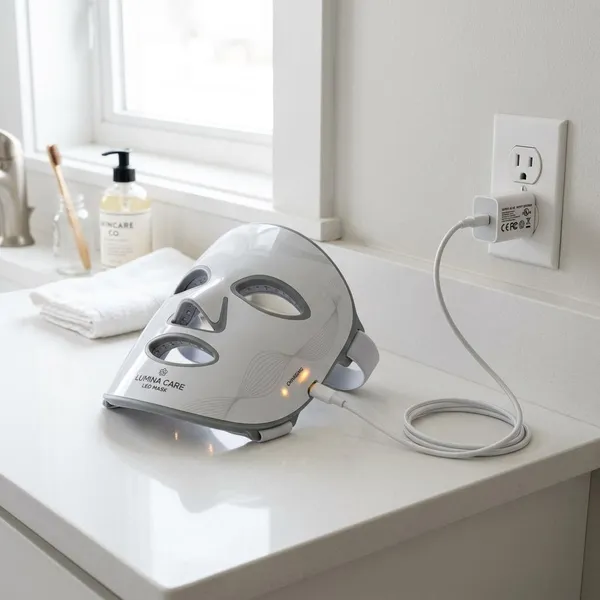
The recommended cable should be your default choice because it fits the port and matches the device design. If the cable is missing, use a good-quality replacement with the same connector type rather than a loose, worn, or bargain cable that cuts in and out.
Use a compatible power adapter
A compatible adapter is one that matches the input requirements listed by the mask brand. If the instructions mention standard USB charging, do not assume a fast-charging phone brick is automatically better.
| Charging situation | Practical choice |
|---|---|
| Regular home use | Use the original cable and a manufacturer-approved USB adapter. |
| Travel or temporary charging | Use a quality power bank or laptop USB port if the manual allows it. |
| Unknown charger output | Avoid it until you can compare it with the device instructions. |
Keep the charging port dry
Only charge the mask when the port, cable, and your hands are dry. If you have just wiped the mask after use, give the charging area time to dry before plugging anything in.
Avoid damaged cables
Replace cables with frayed coating, bent plugs, loose connectors, or exposed wires. Even if the mask still charges sometimes, an unreliable cable can cause heat, interrupted charging, and confusing indicator behavior.
Why is your LED face mask not charging?
If your LED face mask is not charging, troubleshoot from the simplest cause to the most serious one. Start with the cable and port before assuming the battery or controller has failed.
- Confirm you are charging the battery-holding part.
- Push the cable in gently and check both ends.
- Try another compatible cable.
- Try another approved USB power source.
- Inspect the charging port under good light.
- Contact the seller or manufacturer if nothing responds.
Loose cable connection
A loose connection is the easiest problem to miss. If the indicator turns on only when the cable is held at a certain angle, test another cable before blaming the mask battery.
Wrong charging port
On controller-based masks, the wrong port is a very common cause of "not charging" complaints. The mask-to-controller socket may look like an input, but it may not accept charging power.
Use the port that is clearly marked for charging or shown in the manual. If connecting to that port triggers an indicator light, you have likely found the issue.
Faulty cable or adapter
A cable or adapter can fail even if it looks normal. Try the cable with another compatible device, then try the mask with a different approved adapter or laptop USB port.
Dirty or damaged charging port
Lint, dust, or dried skincare residue can block a small charging port. Inspect it under bright light and remove visible debris only with a dry, soft, non-metal tool suitable for electronics.
If the port looks bent, cracked, loose, or pushed inward, stop forcing the cable. That is a repair or support issue, not a cleaning issue.
Battery or controller problem
If the cable, adapter, port, and charging component all check out, the battery or controller may be the problem. Warning signs include no indicator at all, power cutting off immediately after unplugging, unusually short run time, or unusual heat during charging.
This is where it is better to check warranty support instead of opening the device yourself. For a product used near your face, guessing with internal battery repairs is not worth the risk.
Conclusion
The right charging habit is to identify the battery-holding part first, use the correct cable and power source, and stop if the port, cable, or indicator behaves strangely. For light occasional use, this prevents most basic problems; for frequent use, it also helps keep the controller, battery pack, and charging port reliable for longer.
FAQS
How long does an LED face mask take to charge?
Many LED face masks take around 2 to 4 hours, but the indicator light is more useful than the clock. If the manual gives a different charging time, follow that instead.
Should you charge the mask or the controller?
Charge whichever part contains the rechargeable battery. If your mask has a wired controller or separate pack, that piece is often the correct charging point.
Can you leave an LED face mask charging overnight?
It is better not to unless the manufacturer clearly says overnight charging is safe. A daytime charge where you can unplug it when full is the safer routine.